Iframe dimensions
Size the PuzzleMe™ iframe so puzzles are comfortable to play on desktop, tablet, and mobile.
Learn about page layout that is ideal for embedding puzzles in this guide. The iframe size should meet the width and height requirements so that the puzzle is comfortably playable in the constraints posed by the device and the layout, such as sticky header, footers and the side rails.
Recommended sizes
| Desktops and tablets | Mobile phones | |
|---|---|---|
| Minimum width | 700px (900px for grids larger than 15) | 100vw |
| Maximum width | 100vw | 100vw |
| Minimum height | 700px | 100vh minus sticky header/footer |
| Maximum height | 100vh minus sticky header/footer | Same as minimum |
| WordroW height | 630px (fixed) | 630px (fixed) |
Do not let the iframe exceed the available viewport. Prefer max-width: 100vw and max-height: 100vh (minus sticky elements) so the puzzle does not scroll under the fold.
Desktops and tablets
- Set width to at least 700px. For crossword grids larger than 15, use 900px.
- Set height to at least 700px.
- Keep width and height within the viewport (
max-width: 100vw,max-height: 100vh). - For WordroW, use a fixed height of 630px for a snug fit.
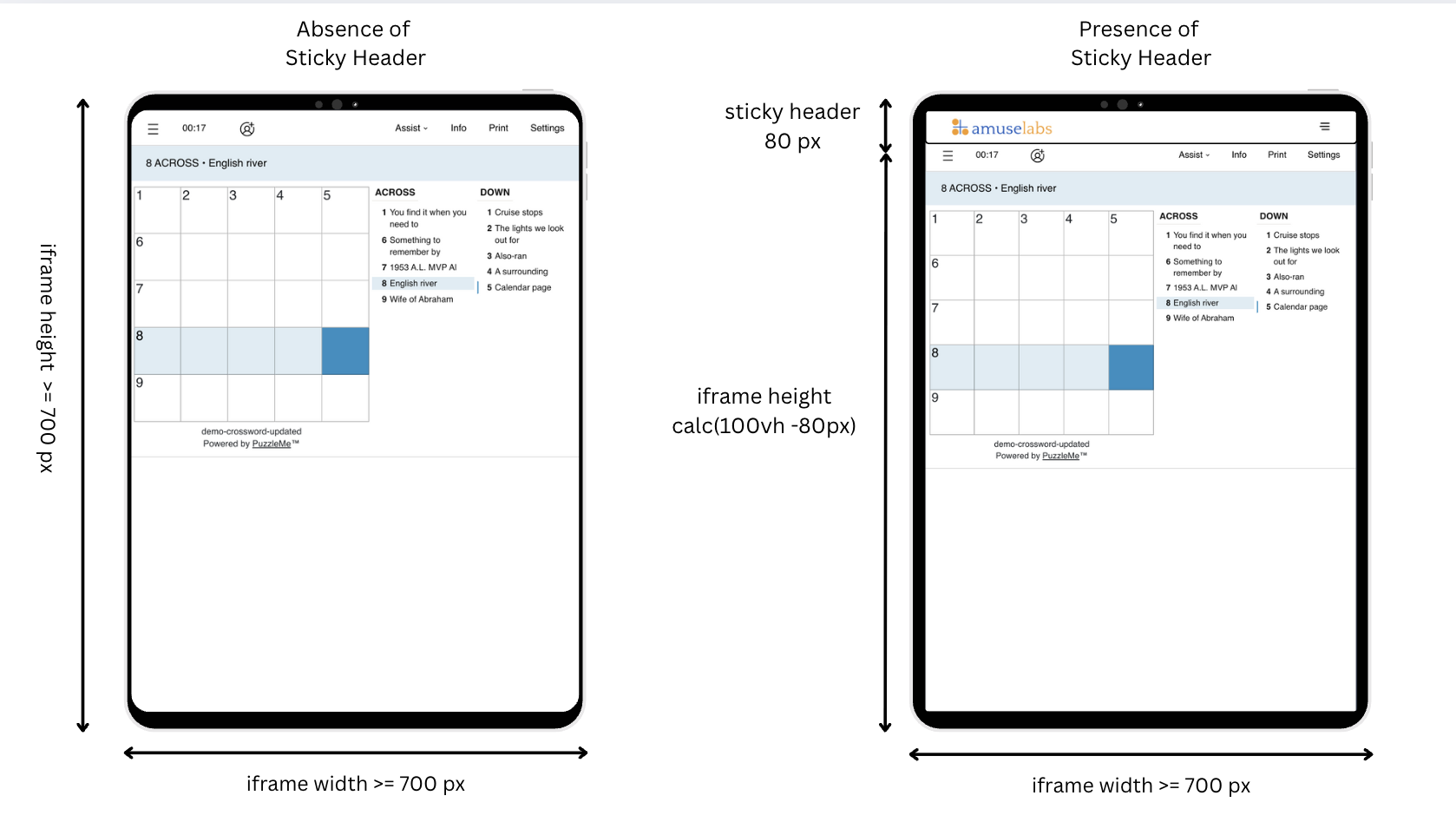
Some iPads and tablets in landscape have less than 700px of available height. Set a max-height so the iframe does not extend past the screen.
Mobile devices
- Give the iframe full screen width (
100vw) and as much available height as possible. - Avoid horizontal padding or margins on the iframe or its parent containers.
- Express height with the viewport—for example
100vh, orcalc(100vh - 80px)if you have an 80px sticky header. - For WordroW, use a fixed height of 630px.
You can use viewport-based sizing on desktop as well (for example height: 100vh). Subtract the height of any sticky menus, headers, and footers.
Page layout
Outer containers around the iframe should be at least as wide and tall as the recommended iframe size. If a CMS or page builder (for example WordPress) constrains the content column, use a fuller-width layout for puzzle pages.
Sticky headers and footers
Sticky headers and footers often cover part of the puzzle—especially on small screens. Disable them on puzzle pages if you can.
With JS embed, set data-mobileMargin on the pm-embed-div to the combined height of sticky headers, footers, and menus. Example: a 15px header and 10px footer → data-mobileMargin="25px".
Sidebars
Sidebars (featured posts, ads, comments) steal width from larger puzzles. Prefer a full-width puzzle layout, or hide the sidebar when the puzzle loads. You can react to load messages from the iframe—see Iframe communication.
Dynamic height
If one page hosts puzzles of different sizes, the ideal iframe height changes per puzzle. PuzzleMe sends the recommended height to the parent via postMessage when a puzzle or picker loads. Listen for those messages and update the iframe height—details in Iframe communication.
Related topics
- iframe embed — copy-paste iframe integration
- JS embed quick start — recommended embed with sizing attributes
- Iframe communication — resize from postMessage events
- Pre-launch checklist — verify sizing before go-live