Upload formats
Learn how to upload Decipher puzzle files and the supported file formats.
You can create Decipher puzzles by uploading a .csv or .txt file. Use a CSV file to upload one puzzle or many at once. Use a text file when you need the grid format for full control over the layout. For a quicker start, you can also use the creator form. Sample files are available on the PuzzleMe upload page.
To upload a Decipher puzzle:
- From your dashboard, click Create, then click New game, and select Decipher.
- In the "New Decipher" dialog, choose your Puzzle series.
- Click Upload.
- Select your file or drag and drop it into the upload panel.
After uploading, you can edit your puzzle using the grid editor. The grid editor allows you to customize the appearance and use features like Shuffle letters to re-scramble the pre-revealed cells. For more information, see Creating a Decipher.
CSV format
PuzzleMe supports uploading Decipher puzzles in .csv format. Each row in the file creates one puzzle. This is the same information you enter on the creator form—your Phrase and Number of rows—plus optional metadata fields.
You can use a CSV file to upload a single puzzle or multiple puzzles in one operation.
Example .csv file:
Phrase,Number of rows,Title,Author,Start message
The best way to predict your future is to create it,6,Sample decipher 6 rows,Amuse Labs,Solve the decipher.
The greatest glory in living lies not in never falling but in rising every time we fall,8,Sample decipher 8 rows,Amuse Labs,Solve the decipher.
Life is what happens when you are busy making other plans,9,Sample decipher 9 rows,Amuse Labs,Solve the decipher.
This CSV contains three Decipher puzzles. Uploading this file will create three separate puzzles in your dashboard.
Click here to download a sample file.
Required fields
- Phrase: The puzzle text. Must be between 10 and 300 characters including spaces. Punctuation marks are not allowed and will be removed if present. PuzzleMe designs the grid for you, the same as the quote format.
- Number of rows: The number of rows in the grid, between 3 and 12. If this value is omitted or invalid, PuzzleMe auto-calculates an optimal value.
Optional fields
- Title: Puzzle title.
- Author: Puzzle author.
- Start message: Optional message shown when the puzzle starts.
- Pause message: Optional message shown when the puzzle is paused.
- End message: Optional message shown after the puzzle is completed.
- Subtitle: Optional subtitle for the puzzle.
- Date (yyyyMMdd): Optional date in
YYYYMMDDformat. - Thumbnail url: Optional thumbnail image URL.
- Backdrop url: Optional backdrop image URL.
CSV field support depends on your plan. If your file includes fields not available on your plan, the upload fails.
CSV fields by plan
| Plan tier | Supported fields |
|---|---|
| Personal | Phrase, Number of rows, Title, Author, Start message |
| Plus | Personal + Pause message, End message, Subtitle |
| Professional | Plus + Date (yyyyMMdd), Thumbnail url, Backdrop url |
| Enterprise | Same as Professional |
Enter the date exactly in Date (yyyyMMdd) format, without separators.
Text file format
The text file used for creating a Decipher puzzle can be any .txt file; for example, famous-quote.txt. This file can be modified by any standard plain-text editor. If you are using a Word Processing program like MS Word or Apple Pages, ensure that you export the output to a text file format with the .txt extension. Do not use .docx, .doc or other document file formats.
Decipher text files can be created in two formats:
- Quote format : In this format, you only provide the quote, and PuzzleMe™ designs the grid for you. This format is more convenient for creating the puzzles.
- Grid format : In this format, you have complete control over the grid design. This format allows you more control over the grid design.
By default, the title of the puzzle is set to "Decipher". After importing, you can use the game editor to update the title, attribution, and other information.
Quote format

- The import file must contain two lines.
- Line 1 should contain the puzzle text. This text should be between 10 and 300 characters including spaces. No punctuation marks are allowed and if present, they will be removed.
- Line 2 should contain the number of rows that should be between 3 and 12. If this value is omitted or invalid, an optimal value will be auto-calculated.
- The pre-revealed cells will be auto-jumbled and this jumble will vary with each import. You could re-upload the file if you would like a different jumble.
- Lastly, as the grid size is limited to 25 by 25, we need you to carefully consider the number of characters in the puzzle text and the number of specified rows. For instance, if the number of characters in the puzzle text is 100 and the number of specified rows is 3, the import will fail as the number of characters per row is 100/3 ~ 34 while it is required to be 25 or less.
Click here to download a sample file. Sample files are also available on the PuzzleMe upload page for your reference.
Grid format
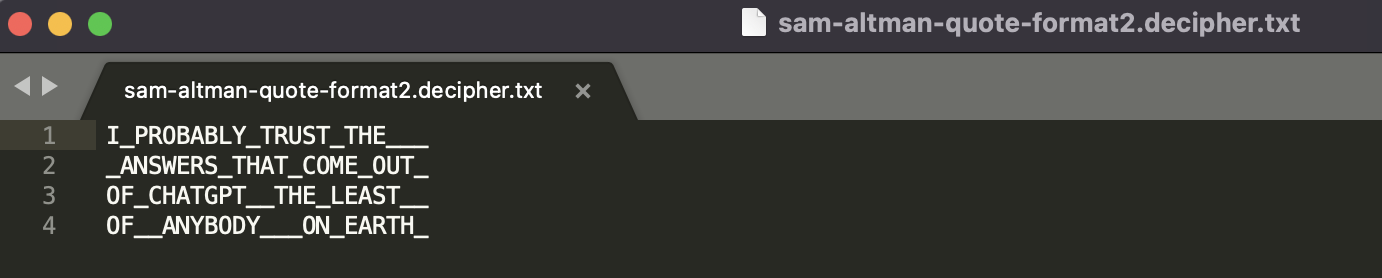
- The total number of characters in the puzzle text should be between 10 and 300. Underscores act as spaces. No punctuation marks are allowed. If detected, the import process will fail.
- As the grid size is limited to 25 by 25, all rows must be of the same length with a maximum of 25 characters per row.
- The number of rows should be between 3 and 12. If less than 2 rows are given, the importer will assume Format 1, which could lead to inconsistencies in the imported puzzle.
- Lastly, please note that words can wrap across lines. If two consecutive words are not separated by an underscore, they will be considered as one word. For example, in the file below:
ALL_THAT_GLITTERS
IS_NOT_GOLD______
_________________
GLITTERSIS would be considered a single word even though they are on separate lines as the underscore between "GLITTERS" and "IS" is missing. The correct specification would be:
ALL_THAT_GLITTERS
_IS_NOT_GOLD_____
_________________
Click here to download a sample file.