Creating a Marching Bands puzzle
Learn how to create a Marching Bands puzzle on PuzzleMe.
Steps
- From your dashboard, click Create, then select Marching Bands.
- Choose a Puzzle series, then click Create.
- In the creator form, ensure the Content tab is selected.
- Enter a Game title and select the Game language.
- (Optional) Enter a Slug, a unique identifier used in the puzzle URL and embed code.
- Choose a Fixed grid size.
- Click Create game. This opens the grid and clue editor with the concentric bands for your chosen grid size already colored in and one clue slot per row and per band.
Grid size
Marching Bands grids are always square, and always an odd size, from 5x5 up to 25x25. The odd dimension is what allows the bands to nest evenly around a shared center; on an odd-sized grid, the single cell at the very center isn't part of any row or band and is blocked automatically.
The number of bands scales with grid size: a 5x5 grid has 2 bands, an 11x11 grid has 5 bands, and a 25x25 grid has 12 bands. In the editor, bands are labeled alphabetically (A, B, C, and so on) starting from the outermost ring, purely to help you keep track of them while building. Solvers never see these letters — in the published puzzle, each band's clue is marked with a color swatch matching its ring in the grid instead of a name.
Grid editor
The left toolbar handles the grid itself: Enter letters, Mark circled cells, Mark font color, Mark pre-revealed cells, and Enter rebus letters.
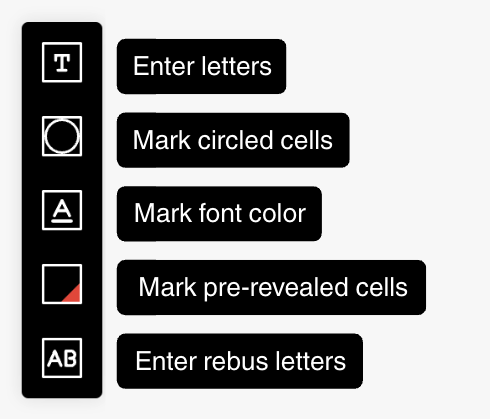
- Enter letters: type the answer letters directly into cells.
- Mark circled cells: highlight specific cells with a circle.
- Mark font color: set a custom font color for selected cells.
- Mark pre-revealed cells: reveal specific letters to solvers before they start.
- Enter rebus letters: put more than one character into a single cell.
Clues
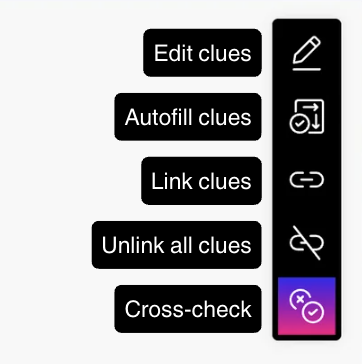
The right toolbar handles clues:
- Edit clues: write or revise clue text for a selected row or band.
- Autofill clues: generate first-draft clues across entries.
- Link clues: create cross-reference clues (for example, "See Row 3").
- Unlink clues: remove existing clue links so you can recreate them.
- Cross-Check: review clue-and-answer pairs and flag possible issues before publish.
Every row and every band is a single clue field. Since the grid has no black squares marking where one answer ends and the next begins, if a row or band holds more than one word, write each word's clue in that same slot, separated by a slash. For example, row 1 in an 11x11 grid holding the words CHAPEL and BACON would get the clue:
Spot for prayer / Food often consumed in strips
Solvers see the clues for that row in order and have to work out from the crossing letters where CHAPEL ends and BACON begins.