Identity & lead generation
Learn how to identify your puzzle solvers and associate them with their contest scores
There are two ways to identify puzzle solvers, and they can be used together:
- Collecting their information in a form within the puzzle player
- Passing an anonymized identifier (UID) for each user from your website
Collect information within puzzle player
This feature is available on our Plus, Professional and Enterprise plans.
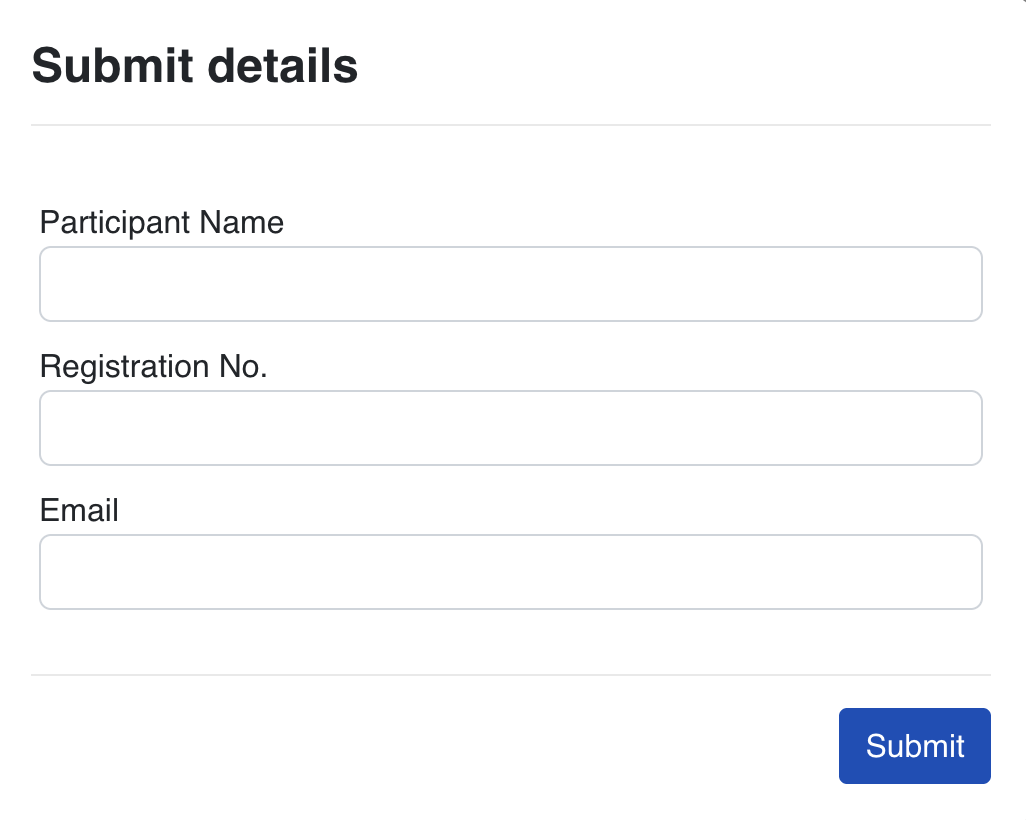
This method shows solvers a short form within the puzzle player. It can collect whatever information you need to identify a solver, such as a name, email, mobile number, employee ID or registration number.
In contest mode, solvers see this form after they submit their puzzle. In non-contest mode, they see it before they start solving.
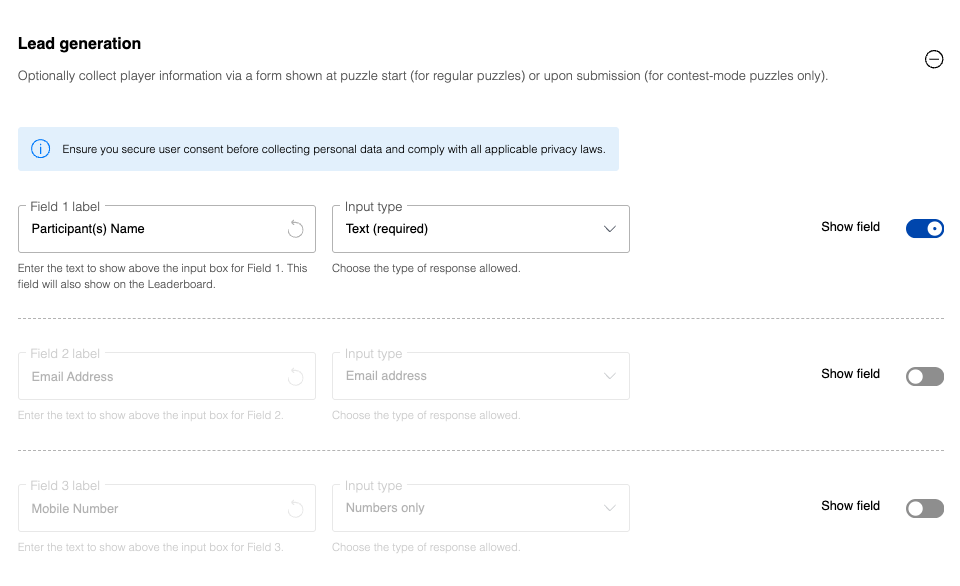
To set it up, go to Series Settings on your dashboard, open the Lead Generation section, and turn on the fields you want to collect. If you're collecting something other than the defaults, customize the label to match, such as "Employee ID" or "Roll Number". You can also choose the type of response allowed for each field:
- Text (required): solvers must enter some text
- Text (optional): solvers can leave the field blank
- Numbers only: only numbers can be entered
- Email address: for collecting email addresses
Save the settings when you're done.
Please ensure that you have valid consent to collect the user's information in their respective jurisdiction.
If possible, we recommend you avoid collecting personally identifiable information (PII) as far as possible. Pseudonymous markers, such as employee number, roll number, ID or registration number, are preferable to collecting real names or emails. You can customize the field labels in the Series Settings to collect any type of identifier that works for your use case.
Pass a UID from your website
You can pass a UID for each user to the puzzle. A UID is an anonymized identifier, so PuzzleMe never receives personally identifiable information. It appears in the UID column of the Play by Play table, letting you associate each play with a user in your own system. If you also collect details in the form above, the UID and the entered details appear together in the same row.
- If your website has user logins, use each user's account ID (hashed) as the UID. This identifies the person, wherever they sign in from.
- If it doesn't, you can generate a random ID, store it in a first-party cookie on your site, and pass a hash of it. This only identifies a browser: someone using a different browser or a private window gets a new ID.
See the reference documentation on user identity for details, including the setup for sites without logins.
Multiple attempts
We uniquely identify solvers by attempting to place a cookie on their browser. If cookies are disabled, or they access the puzzle from a new browser or private window, solvers may be able to attempt the puzzle multiple times. Collecting player information in the form does not guard against multiple attempts.
Passing a UID based on your site's user logins lets you restrict each logged-in user to a single puzzle attempt. A cookie-based UID can't do this, since a new browser or private window gets a new ID. Contact us if you'd like help integrating this with a specific platform like WordPress or Wix.