
You’re ready to add PuzzleMe games to your newsletter, but there’s a small problem: most email providers like Gmail and Outlook don’t support embedding interactive games directly in emails. This is because email clients block JavaScript and interactive elements for security reasons. But don’t worry, here are two effective methods to work around this limitation.
Before we dive in, know that regardless of which method you choose, PuzzleMe allows extensive branding customizations. You can adjust colors, fonts, and messaging to match your brand guidelines, include your logo and sponsor content in the start screen, pause and end messages.
Option 1: Direct Game Link
This is the simplest method. Create your game on PuzzleMe, copy the direct URL, and add it as a hyperlink in your newsletter. When readers click, the game opens full-screen in their browser.
How It Works:
- Create your game on the PuzzleMe platform and copy the direct link
- Add the link as a hyperlink (button, image, or text) in your newsletter
- Send your newsletter
This approach is quick and easy to implement with minimal workflow and no technical setup required. The game opens in a distraction-free mode and can be fully themed to match your brand. It’s ideal when you don’t have a website for your newsletter, want the fastest setup, or are just getting started with games.
The main trade-off is that readers will go directly to the game hosted on the Amuse Labs domain. You also won’t be able to add additional content or advertisements around the game. However, you can always customize the start screen and include your logo and other messaging to your readers. [For more information on how to customize your start screen, click here].
Example:
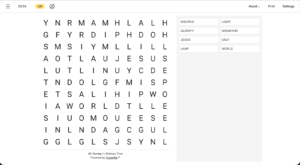
See how the weekly Catholic newsletter “Start with Sunday” does it. They send Sunday readings to help children and parents prepare for Mass together.

Option 2: Embed on Your Website and Link to the Page
If you have a website, another approach is possible. Instead of linking directly to the hosted game, you embed it on your own webpage using an iframe. An iframe is like a window that displays content from another source on your page. Then, you link to that page in your newsletter. You can optionally use page anchors (links that jump to a specific section of a page) to take readers straight to the game.
How It Works:
- Create or choose a page on your website where the game will live. Tag or categorize this page (e.g., ‘Games’, ‘Puzzles’, ‘Weekly Games’) so readers can click the tag and easily discover all your games in one place.
- Create your game on the PuzzleMe platform and copy the iframe embed code
- Add the iframe to your webpage by pasting the embed code into your site’s HTML. You can control the size of the iframe and add other content around it like intro text, archive links, or ads
- Publish the page
- Copy the page URL (optionally add a page anchor like #game to link directly to the game section)
- Add this link to your newsletter as a button or hyperlink
- Send your newsletter
This method gives you significantly more control. You drive traffic to your own website and since only the iframe contains the game, the rest of the page is fully under your control for branding. You can add context before the game, monetize the page with advertisements, and create a dedicated “Games” section to build an archive over time.
If you choose this method, you have two approaches: you can either publish each game alongside its corresponding newsletter edition, or create a dedicated games section where all puzzles live in one central archive and link the latest game to your newsletter.
This option is ideal when you have a website, want to drive traffic to your site, need maximum branding control, plan to monetize with ads, or want to build a games archive.
Example:
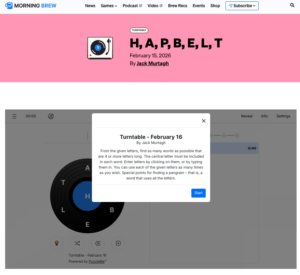
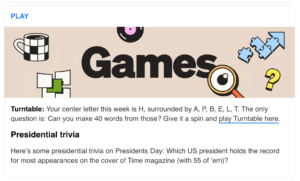
See how Morning Brew (a daily business newsletter with 4M+ subscribers) does it. They consistently place games at the bottom of the newsletter to encourage readers to scroll to the end. It is one of the most-clicked sections in the newsletter.
Quick Comparison
| Feature | Direct Link | Website Embed |
| Setup Effort | Low | Moderate |
| Website Required | No | Yes |
| Drives Traffic to Your Domain | No | Yes |
| Branding Control | Game-level | Full page control |
| Monetization Flexibility | No | Yes |
Choosing the Right Approach
Your choice comes down to your setup and goals. Use the direct link if you don’t have a website, want the fastest and easiest setup, or are testing games for the first time. Use the website embed if you have a website, want to drive traffic to your site, plan to monetize with ads, or want to build a games archive.
Implementation Tips
Since you can’t embed the game directly in an email, presentation matters.
- Use a Clear Call-to-Action
- Instead of pasting a raw URL, use:
- A button or
- A game thumbnail image or
- A bold text link
- Make it obvious that it’s interactive.
- Consider placement and be consistent
- If you’re publishing weekly puzzles, keep their placement consistent in your newsletter so readers know where to find them.
Need help getting started? Check out our full guide on adding games to newsletters or contact us with questions.

- AI News Quiz for Local and Independent Publishers: It’s Never Been Easier - March 20, 2026
- Add PuzzleMe Games to Your Newsletter (Technical Guide) - March 9, 2026
